Dual-engine database · PostgreSQL-compatible

Faster reports.
Less load on your operational database.

GritDB is a dual-engine database that adds a columnar analytics engine to the PostgreSQL engine. It receives changes from your operational database and runs heavy reports in its place.

  • Your operational database needs only replication or a CDC/ETL connection, and your applications stay as they are
  • Reporting and BI tools connect with PostgreSQL drivers
  • Installs on your own servers (on-premises) or in the cloud

Validated by a financial services customerA report query that took 229 seconds on 200,000 rows in the existing PostgreSQL ran in 8.8 seconds on 10 million rows, 50 times the dataSee the case

If this sounds familiar

How GritDB solves them

The Architecture page explains what happens on your operational database when you add the analytics system: during setup, in normal operation and when the analytics system stops.

Transactions in rows, analytics in columns

Applications Writes · business queries
Reporting · BI tools Aggregation · report queries

GritDB

Connect with PostgreSQL drivers · SQL

Regular session
Analytics session
Transaction engine PostgreSQL engine Stores rows
Analytics engine GritDB engine · columnar files

PLUG UNIFY BURST

One connection point: the transaction engine handles regular sessions, and the analytics engine handles queries in analytics sessions

The transaction engine is the PostgreSQL engine. So applications and BI tools connect to GritDB with the PostgreSQL drivers and SQL they already use. CDC/ETL tools that write to PostgreSQL also work with GritDB as they are. The analytics engine runs queries in analytics sessions, that is, queries that read only registered tables. The transaction engine handles writes and all other queries. For the exact conditions, see the query paths on the Architecture page. For 1.1, we recommend adding GritDB next to your operational database as an analytics system. Business applications stay connected to the operational database as they are now. For details, see the Ways to adopt section on the Architecture page.

Demo videos

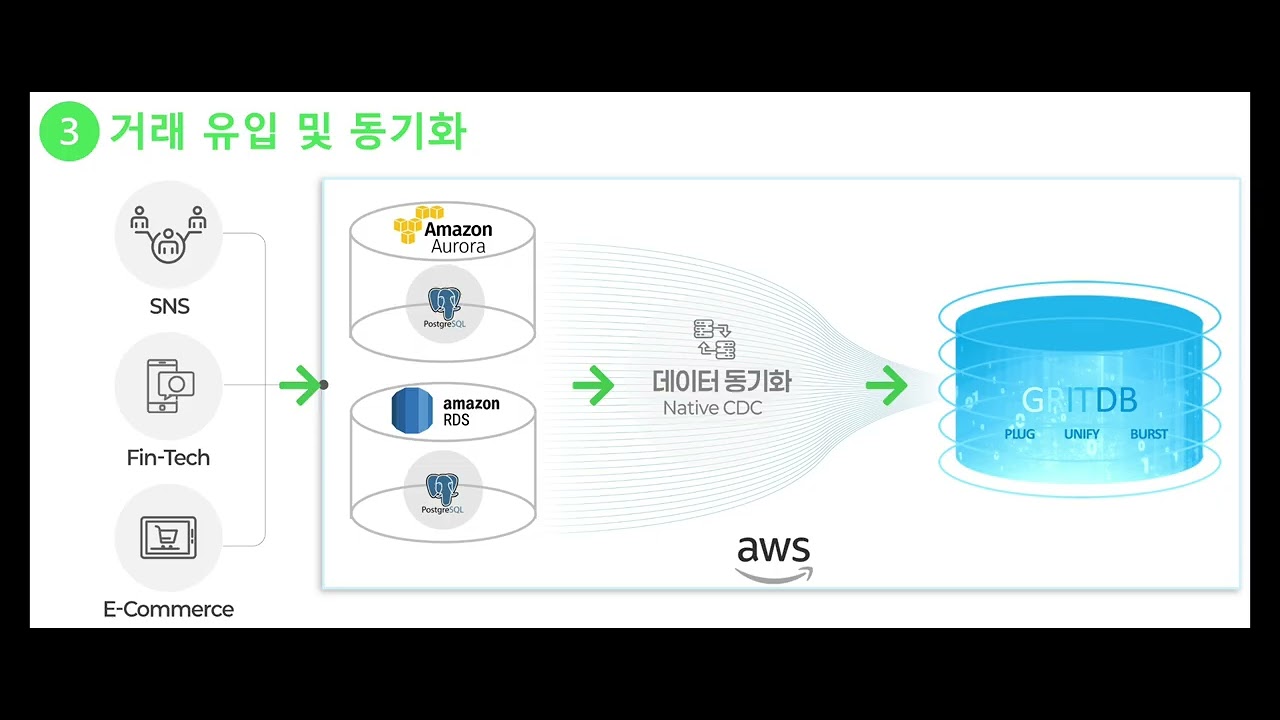
Adding an analytics system to AWS PostgreSQL (Amazon RDS · Amazon Aurora)

You turn on logical replication (rds.logical_replication) in Amazon RDS and Amazon Aurora PostgreSQL and create a publication. GritDB subscribes to it and receives the changes, and you query the data in an analytics session.

Length
1 min 50 s
Show the demo environmentHide the demo environment
Operational database
Amazon RDS · Aurora PostgreSQL (db.r7g.2xlarge · 8 vCPU, 64 GB)
GritDB
Amazon EC2 r7i.8xlarge (32 vCPU, 256 GB)

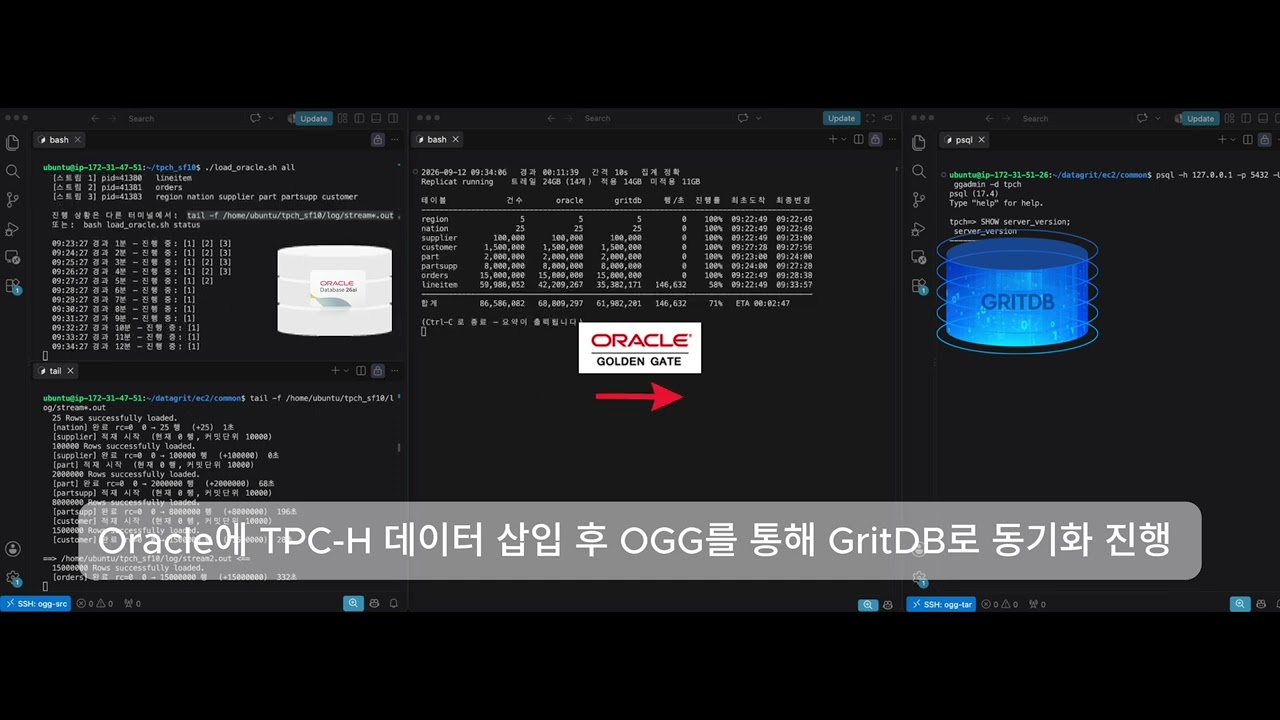
Syncing Oracle® to GritDB with a CDC tool

TPC-H data (SF10, 86.58 million rows in 8 tables) is loaded into Oracle and synced to GritDB with a CDC tool.

Length
29 s
Show the demo environmentHide the demo environment
Source
Oracle Database 26ai
Target
GritDB (transaction engine: PostgreSQL)
Comparison
PostgreSQL
Server
Amazon EC2 r8i.16xlarge (64 vCPU, 512 GB) · same instance type for all three

The videos open in a YouTube player when you click them.

Amazon RDS, Amazon Aurora and Amazon EC2 are trademarks of Amazon.com, Inc. or its affiliates. Oracle is a registered trademark of Oracle and/or its affiliates. TPC-H is a trademark of the Transaction Processing Performance Council.

Where GritDB fits

How adoption works

  1. 1

    Discovery meeting

    We look at a few slow reports with your DBA and check whether GritDB fits. We also set the scope, length and cost of the PoC.

  2. 2

    PoC

    We test with your data and reports. The PoC is paid. If you subscribe, we deduct the PoC fee from your first-year subscription fee. The evaluation license runs for up to 90 days.

  3. 3

    Contract

    Datagrit works out the number of Units with you and sends you a quote. You sign the order form and the license agreement.

  4. 4

    Installation · operation

    You can install GritDB yourself or have it installed for you. You renew the subscription every year.

The full purchase steps, from quote and contract to getting the installation files and renewal, are on the Subscription page.

GritDB 1.1 starts with the analytics system

In analytics sessions, the analytics engine runs queries that read only registered tables. These queries read changes after they are batched into columnar files, so a change you just committed is not visible right away. In our tests, it usually became visible after 12 seconds, and 99 times out of 100 within 22 seconds. If you added GritDB as an analytics system, replication time from the operational database adds to this. Run queries that must have the latest values in a regular session, or on the operational database if you added GritDB as an analytics system. From the next version, we will expand the range of operations and analytics that a single GritDB can handle together.

Create columns that must be exact, such as amounts, as numeric(p, s) with a declared precision, and keep p at 38 or less. The analytics engine computes numeric columns without a declared precision as approximate values.

The two engines, the ways to adopt GritDB and the query paths are on the Architecture page. Things to know about 1.1, such as high availability, row-level security (RLS) and supported column types, are collected in Notes for 1.1 on the Architecture page.

See GritDB for yourself

Ask for a discovery meeting or a PoC, and we will get in touch.